Know which rooms are ready, what's broken, and who's fixing it.

Maintenance and operations software for independent hotels, resorts and villas of 20 to 150 rooms. Guest requests, repairs, housekeeping and handovers, on every phone. And every week, we review your backlog and send you a short report where every overdue job has an owner.

Start free trial  14 days, no card needed.

  • $299 a monthPer property. Unlimited users. Month to month.
  • Set up for youWe import your rooms, equipment and open issues.
  • Read every weekA short Monday report: every overdue job has an owner.
  • On every phoneStaff stay signed in, in their own language, even without signal.
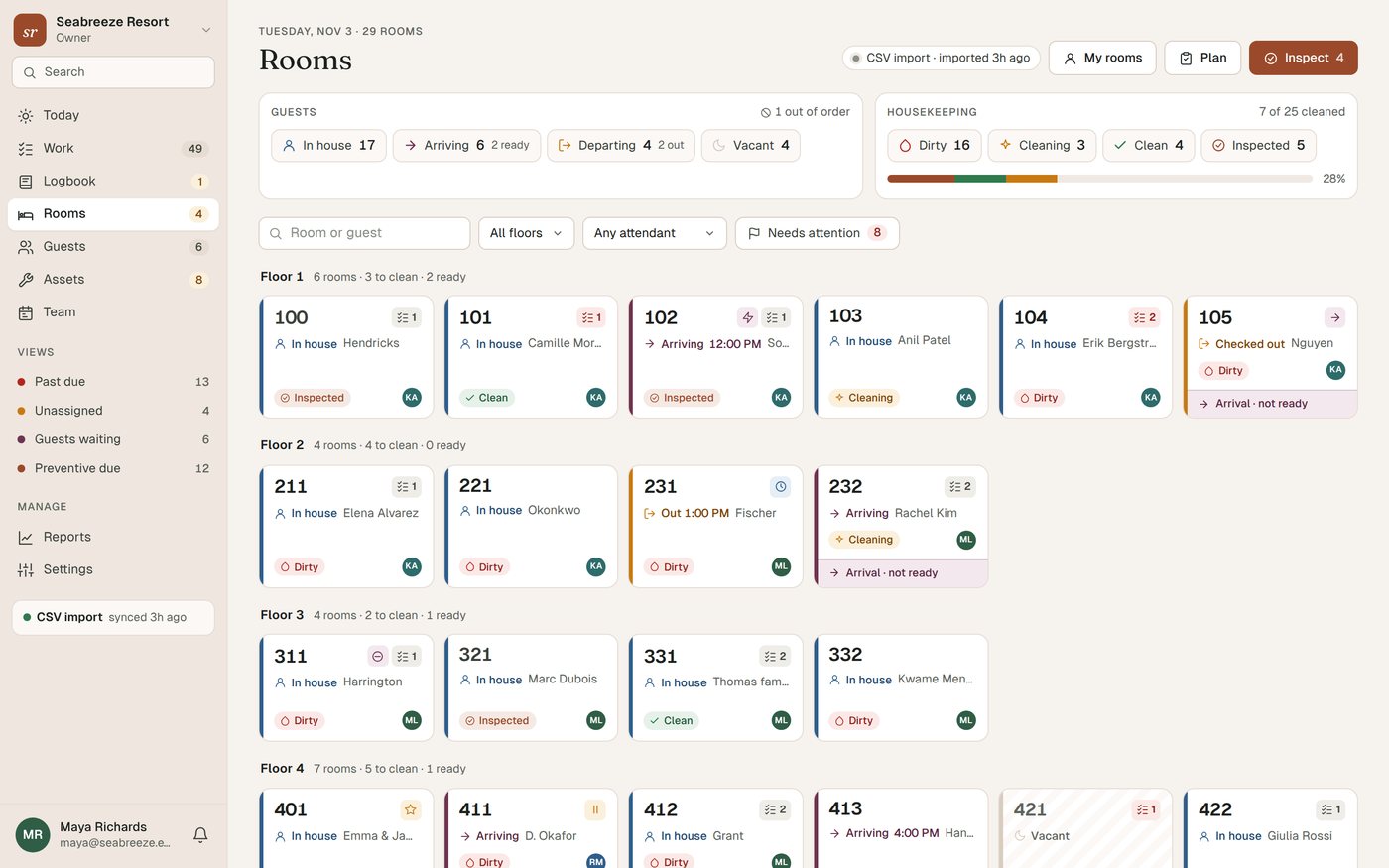
The Turndown room board for a 29-room resort: guests in house, arriving and departing, and each room's cleaning status, floor by floor.
The guest page for room 423 on a phone: Air conditioning is selected and the guest has typed that water is dripping from the AC onto the floor.

The room board and the guest QR page from our demo property, Seabreeze Resort. Every app screen on this page is a real capture, not a mock-up.

Follow one dripping AC from the guest's phone to Done

We reported a leaking air conditioner in room 423 of the demo property and worked it through the app, one real step at a time. These are the screens it produced.

  1. 18:29

    The guest scans the QR code by the bed

    Guest, room 423

    Mr Lee taps Air conditioning and types what's wrong. No app to install and no login. The page comes in English, Spanish, French, German and Portuguese, and it already knows which room he is in.

    Guest page for room 423 with Air conditioning selected and the message: Water is dripping from the AC onto the floor by the bed.
    The guest page for room 423, opened from its QR code.
  2. 28:29

    It lands in Work with a priority and a deadline

    Work queue

    Air conditioning is a High priority category at this property, so the job gets a two-hour service target and lands in the queue under Guests waiting, sorted by urgency. Auto-assign is switched on, so it goes to the least busy engineer on shift: Jason.

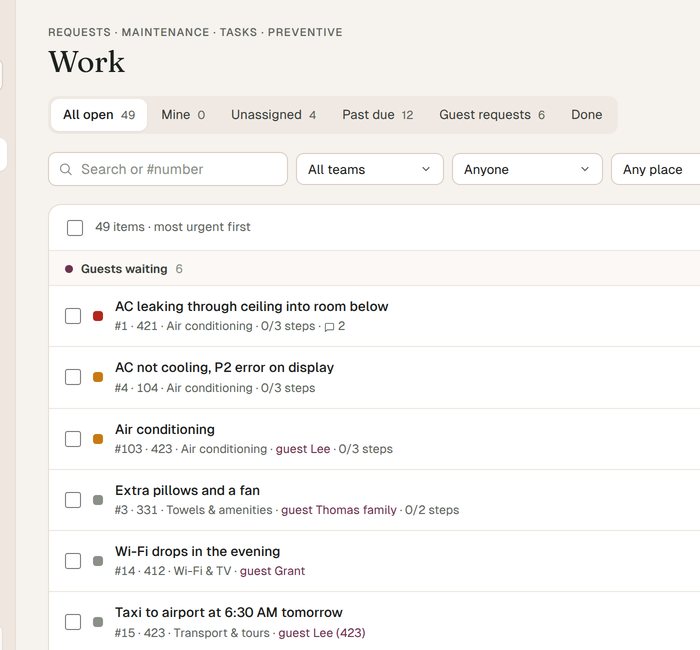
    The Work queue. Under Guests waiting, job #103 Air conditioning in room 423, from guest Lee, due today 10:29 AM, assigned to Jason.
    The Work queue, sorted by what is most urgent. #103 is the new request.
  3. 38:35

    The engineer has it on his phone

    Jason, maintenance

    Jason sees the job in his list and in his notifications. It tells him 423 is a departure today, so he knocks and announces. He taps Start and the guest's page changes from Received to On it.

    Job #103 on Jason's phone: High priority guest request, due 10:29 AM, a note that 423 is departing, and Start, Done and Hold buttons.
    Job #103 on Jason's phone, with the checklist for AC faults.
  4. 48:41

    The room is held on the housekeeping board

    Nadia, executive housekeeper

    Mr Lee checks out at 11. Until the job is closed, 423 shows Blocked by #103, so nobody hands it to tonight's arrival. Nadia adds the reason so the front desk can see why.

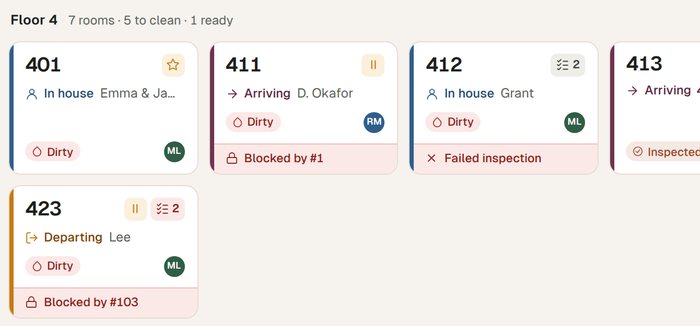
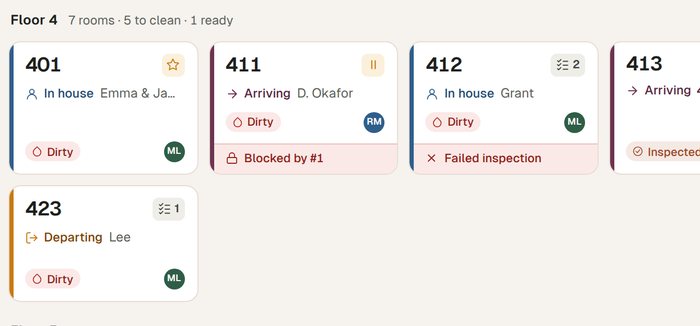
    The fourth floor of the room board. Room 423, departing, dirty, on hold, with a red bar: Blocked by #103.
    The room board, fourth floor. 423 is departing, dirty and blocked by the open job.
  5. 59:08

    Fixed, with a photo

    Jason, maintenance

    The drain line was blocked with algae. Jason flushes it, runs the required 10-minute cooling test, attaches a photo and taps Done. The checklist will not let a job close with a required step left open.

    Job #103 on Jason's phone after the fix: checklist 3 of 3 including the required cooling test, a photo of the AC unit, and his note: drain flushed and treated, cooled for 10 minutes with no drip. Marked done at 9:08 AM.
    The finished checklist and the photo, on the job.
  6. 69:08

    The room releases itself

    Housekeeping

    Closing the job clears the hold. Nobody has to remember to go back and unblock 423, and the housekeeping supervisors get a notification that it is no longer blocked. Once Mr Lee checks out, it goes through the normal clean and inspection before anyone sells it.

    The fourth floor of the room board after the job was closed. Room 423 is departing and dirty, with no hold and no blocked bar.
    The same part of the board a moment after Done. 423 is no longer blocked.
  7. 79:08

    The guest sees it's done

    Guest, room 423

    Mr Lee's page shows Received, On it and Done with the times, plus the note the team chose to share with him. Then it asks how we did. A rating of one or two stars alerts the managers while the guest is still in house.

    The guest's status page: Received 8:29 AM, On it 8:35 AM, Done 9:08 AM, the message from the team, and How did we do? with five stars.
    The guest's status page after the job was closed.

Every step left a line in the job's history: who did what, and when. That history is what the Monday review reads.

Every Monday, we read your backlog

Software doesn't close jobs. People do, when someone keeps asking about them. Most systems leave that part to you. We do it every week, alongside you.

  1. We go through every open jobOverdue work, jobs with no owner, jobs with no date, and anything that keeps coming back.
  2. You get a short reportEvery overdue job in it has an owner and a next step. Readable on a phone in two minutes.
  3. Once a month, a 20-minute callWe go through the month with you: what moved, what did not, and what to fix properly.

Who reads it? Turndown is built by hoteliers who run a resort. The people reading your backlog know what a blocked condensate drain does to a guest review.

Sample. Fictional hotel, made-up numbers. From Turndown review <hello@turndownhq.com> To Maya Richards, General Manager Subject Monday backlog: Seabreeze Resort, week of 2 November

Morning Maya. 49 jobs open, 12 past due. Eight of the twelve are AC services that slipped, so that is mostly one fix. Everything overdue now has a name next to it.

49open jobs
12past due
28 daysoldest overdue
82%on time, last 30 days

Overdue, with an owner

JobLateOwnerNext step
#92 Quarterly AC service, 100 and 7 more rooms28 daysLeon C.Two rooms a day while vacant, starting Tuesday. Phil to book around arrivals.
#5 Monthly generator test20 daysPhil A.Wednesday 7am, before check-ins. Log the run time.
#6 Clean valley on 101 roof13 daysLeon C.On hold for a dry day. Moved to Friday, not left open.
#97 Walk-in chiller service7 daysPhil A.Call the refrigeration contractor today for a Thursday slot.

Keeps coming back

  • AC unit in 421: three drain-line faults in six months, and it leaked into 411 below again this week. Worth replacing the drain pan, and adding a drain flush to the quarterly service for every AC.

Close or merge

  • Three jobs look finished or duplicated. We have listed them in the app for you to close in one go.

Next monthly call: Thursday 11am, 20 minutes. Reply to this email to move it.
The Turndown team
What's in Turndown

Seven parts that share one list of rooms, people and jobs. A request from a guest, a fault on a chiller and a note at shift change all end up in the same place, with a name and a time on them.

01 Today

What needs a decision this morning.

The first screen a manager opens. It is built from rules, not guesses, so you can always see why something is on it.

  • Arrivals whose room is still dirty, or blocked by an open repair
  • Guest requests nobody has taken, and jobs more than a week past due
  • Places that keep coming back, and routines that have been missed
  • Low guest ratings from the last week, while you can still fix it
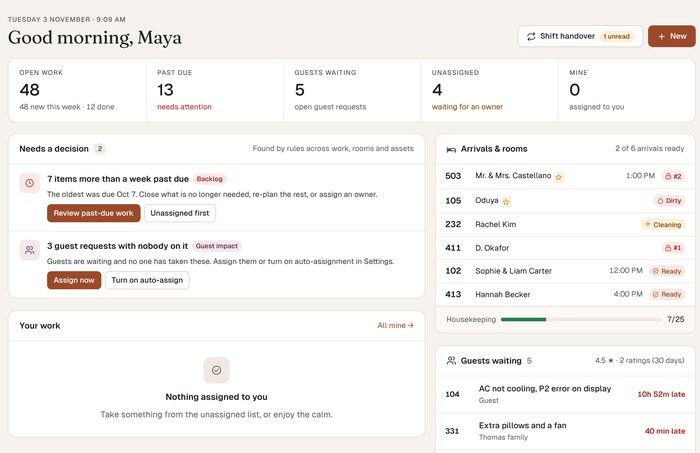
Today for the general manager: open work, past due, guests waiting and unassigned counts; two decisions found by rules; arrivals with their room status, including rooms blocked by open jobs; and guests waiting.

02 Work

One queue for everything that needs doing.

Guest requests, repairs, recurring tasks and inspections in one list, sorted by what is most urgent.

  • Photos, checklists with required steps, comments and the full history on every job
  • Service targets per priority, so every job gets a due time the moment it is created
  • Assign by hand, or let it go to the least busy person on shift
  • Everything works on any phone, one-handed: start, hold, done, add a photo
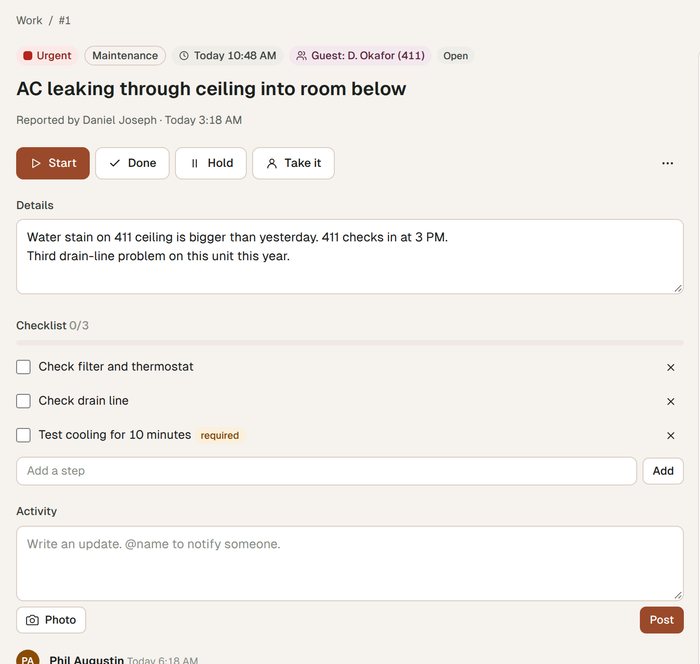
Job #1, AC leaking through the ceiling into the room below: Urgent, due 10:48 AM, a checklist with a required cooling test, and comments from the chief engineer and front office.

03 Rooms

A housekeeping board that knows about repairs.

Every room's occupancy and cleaning status on one live board, by floor.

  • Dirty, cleaning, clean and inspected, with the inspection step built in
  • Rooms held while repairs are open, and released when the job is done
  • Connects to Cloudbeds, Mews or Apaleo, or takes a CSV from any other PMS
  • Sync health on the board itself, so you know the data is current
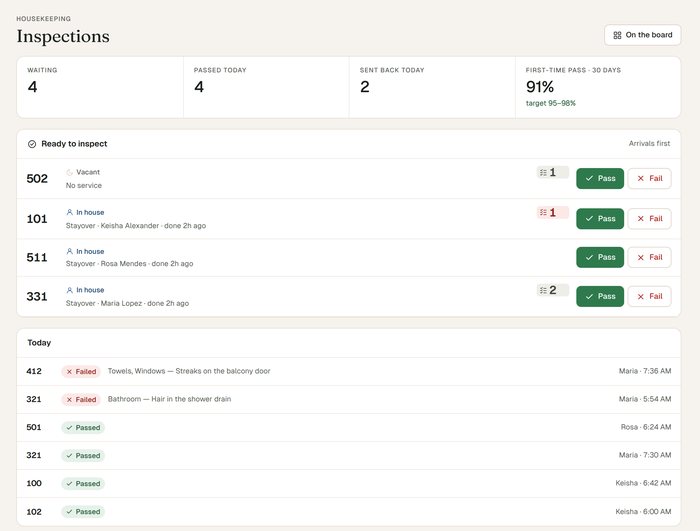
The inspections screen: four rooms ready to inspect with Pass and Fail buttons, and today's passed and failed inspections with the reason.

04 Assets and preventive maintenance

Every AC, pump and chiller, with its history.

An equipment list your engineers can actually use, because they reach it by scanning a tag.

  • QR tags on equipment: scan to report a fault or log a service
  • Service history, spend and age on each unit
  • Preventive maintenance schedules that create the work by themselves
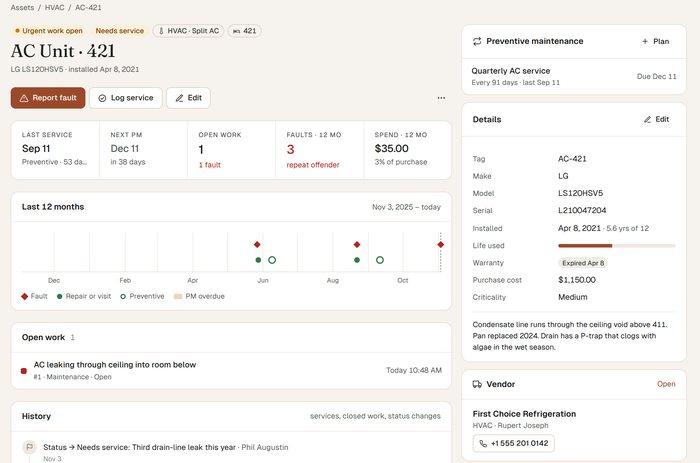
  • Repeat faults flagged, like the AC in 421 with three drain-line faults in six months
AC Unit 421: last service, next preventive maintenance, three faults in twelve months marked repeat offender, a twelve-month timeline and the full service history.

05 Guest room QR

Guests ask from the room, and see the answer.

A QR code in each room opens a page with your hotel's name and colours. Guests report a problem or ask for an item in a couple of taps.

  • English, Spanish, French, German and Portuguese
  • The request lands in Work with the room already filled in
  • Guests follow it live: Received, On it, Done
  • Messages you mark as shown to guest appear on their page
The guest page in Spanish: Que podemos traerle, with the same request buttons.
A guest's status page while the job is in progress: Received, then On it, with a note from the team.

06 Logbook and shift handover

Open notes carry over to the next shift.

The notebook at the front desk, except everyone can read it and you can tell who has.

  • Notes with read receipts, and acknowledgements for the ones that matter
  • Notes stay open, shift after shift, until someone resolves them
  • A handover screen: what is urgent, past due and waiting for you
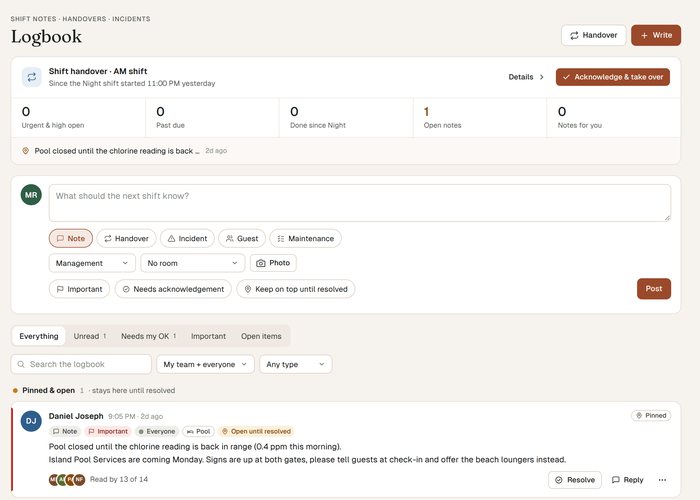
The logbook: the shift handover summary, a pinned note about the pool, and notes from the front office with read counts and acknowledgements.

07 Reports

The numbers a GM asks about on Monday.

Worked out from the job history, not typed in by someone at the end of the month.

  • On-time %, first response and re-open rate
  • Backlog age: how much is open, and how old it is
  • By team, category, room or person
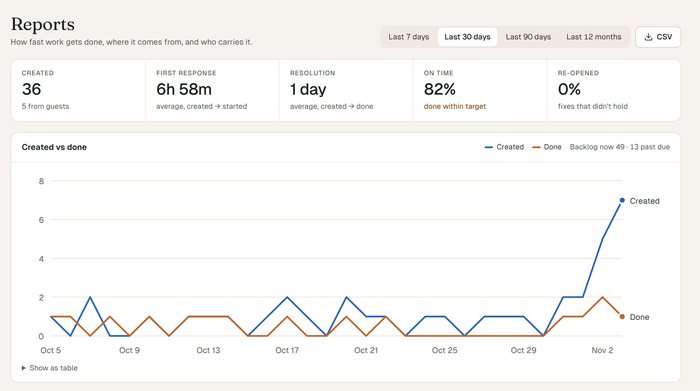
Reports for the last 30 days: jobs created, average first response, resolution time, on-time percentage and re-open rate, and a chart of jobs created against jobs done.

Made for the phone in their pocket

Your engineers and housekeepers are not at a desk. Turndown works the same on a phone as on a computer, and it does not get in their way.

  • Signed in for 30 daysOn their own phone. No password at the start of every shift.
  • Works without signalChanges made in the plant room or the basement are kept on the phone and sent when it reconnects.
  • Their own languageEach person picks the language they use the app in.
  • One-tap translationA note written in Spanish can be read in English, and the other way round.
Rosa's list of rooms on her phone, in Spanish: room 503, departure clean, early check-in for a VIP guest, blocked by an open job until a supervisor releases it.

One plan, one price per property

No per-room maths and no per-user seats. Add every engineer, housekeeper and night auditor you have.

Turndown, software and weekly review

$299per property, per month

US dollars. Month to month, cancel any time. 14-day free trial, no card.

  • All seven parts: Today, Work, Rooms, Assets, Guest QR, Logbook, Reports
  • Unlimited users, on as many phones as you like
  • Setup included: we import your rooms, equipment and open issues
  • PMS connection: Cloudbeds, Mews, Apaleo, or CSV
  • Your backlog reviewed every week, with a short report
  • A 20-minute call every month

Check the maths for your property

60

60 rooms: $299 a month, about $4.98 per room. The price is the same at 20 rooms or 150.

Software on its own, or software and someone reading it
QuestionSoftware on its ownTurndown
Getting startedAn empty account. You type in rooms and equipment yourself.We import your rooms, equipment and open issues before you start.
The backlogRead when someone finds the time.Read by us every Monday, with a report in your inbox.
Overdue jobsEasy to leave open with nobody on them.Each one gets an owner and a next step in the report.
Talking to a personA support ticket when something breaks.A 20-minute call every month about your property.

Plenty of good tools stop at the software. If someone on your team already reads the whole backlog every week, you may not need ours.

Questions hoteliers ask us

How long does setup take, and what do you need from us?

Your trial account works the day you sign up. For the setup, send us what you already have: a room list, an equipment list if you keep one, and your open jobs in whatever form they live in today, a spreadsheet, a whiteboard photo or a PMS export. We import them, so your team starts with your real hotel instead of an empty screen. How long that takes depends mostly on how quickly we get the lists.

Which PMS do you connect to?

Cloudbeds, Mews and Apaleo connect directly. For any other PMS, Turndown takes a CSV export. The room board shows when the last sync happened, so you know whether the occupancy you are looking at is current.

Do my staff need to download an app?

No. Turndown runs in the browser on any phone, tablet or computer. Each person stays signed in on their own phone for 30 days, and changes they make without signal are saved and synced when the phone reconnects.

What languages does it work in?

Each person picks their own language for the app, and notes can be translated with one tap. The guest QR page comes in English, Spanish, French, German and Portuguese.

Can we export our data?

Reports export to CSV, by team, category, room or person, whenever you want them.

How is our data kept separate and safe?

Every record belongs to one property, and every request is checked against the properties that person belongs to. Data is backed up automatically. Changing a password signs that person out of every remembered phone.

What if we want to cancel?

It is month to month with no contract. Cancel any time.

We have two properties. How does pricing work?

$299 a month for each property. Staff who work at both use one login and switch between them.

Who does the weekly review?

We do. Turndown is built by hoteliers who run a resort, so the people reading your backlog have stood in a plant room at 7am with a guest waiting on a hot room.

Look around the demo resort

A fully set-up resort with rooms, a team, guests and open jobs, so you can see how it would look with yours. Or book a call and we will walk you through it.

Start free trial  14 days, no card needed.